At this point, I am pretty sure you have heard about OpenAI’s latest AI model, GPT 6 Astra, or at least saw a post about it on social media. The model, besides being so token-hungry, has been really good in a lot of ways.
I used to build stuff on Codex back in the day, and it is amazing to see how far the technology has evolved from simple text completion to complex reasoning. The compute cost makes sense when you see the actual output quality.
I’ve actually written a separate post about it. Check out the eight cool things people have used Astra for in the article below.
https://generativeai.pub/8-cool-things-people-use-gpt-6-astra-for-801a03e237d2
It is also great at research and writing, and works incredibly well with third-party platforms such as the desktop tool After Effects and a browser-based design platform, Topview AI.
Seeing an LLM operate as an autonomous agent inside a video editor completely changes the creative process. You no longer have to jump between five different tabs just to generate a single usable clip.
In this guide, let’s talk about what is new with the Astra model, how to set it up on Topview, and the different ways you can use it to make awesome videos.
Let’s get started.
What’s new in GPT 6 Astra?
Before we jump into the tutorial, it helps to understand why everyone is suddenly switching their workflows to this specific model. OpenAI did not just increase the context window here. They changed how the AI understands the tasks you give it.
Native visual understanding: Older models had to translate text into images and hope for the best. Astra processes everything in a unified way. When it reads a character description, it understands the spatial dimensions of that character.
Proactive reasoning: Instead of just spitting out an answer immediately, Astra takes a moment to plan. It acts like a real director. It looks at the script, figures out the necessary camera angles, and builds a logical sequence before it even starts generating the video prompts.
Contextual memory over long projects: If you are generating a three-minute video, you need the last scene to remember what happened in the first scene. Astra excels at this. It remembers that a character left their jacket in the previous shot and ensures they are not wearing it in the next one.
You can learn more about what is new in Astra and how people are using it in the article below.
https://generativeai.pub/8-cool-things-people-use-gpt-6-astra-for-801a03e237d2
Using GPT 6 Astra For AI Videos
There are many ways to create AI short films right now, but one that I highly recommend is using Topview AI. It’s got some of the most advanced video generation tools out there and also supports the latest and most powerful models like Seedance 2.5 for video and GPT 6 Astra for agents.
Most platforms force you to piece everything together manually, but Topview built an entire ecosystem around making the generation process seamless.
To get started, head over to topview.ai and create an account. For this demo, I will be using the Canvas tool to create a mini AI film. I will also set the agent’s model to GPT 6 Astra as shown in the image below.
You want to make sure you select the correct model in the dropdown so you can take advantage of the advanced reasoning I mentioned earlier.

For the story and script, let’s combine the “Short Film Scriptwriter” skill and the following prompt.
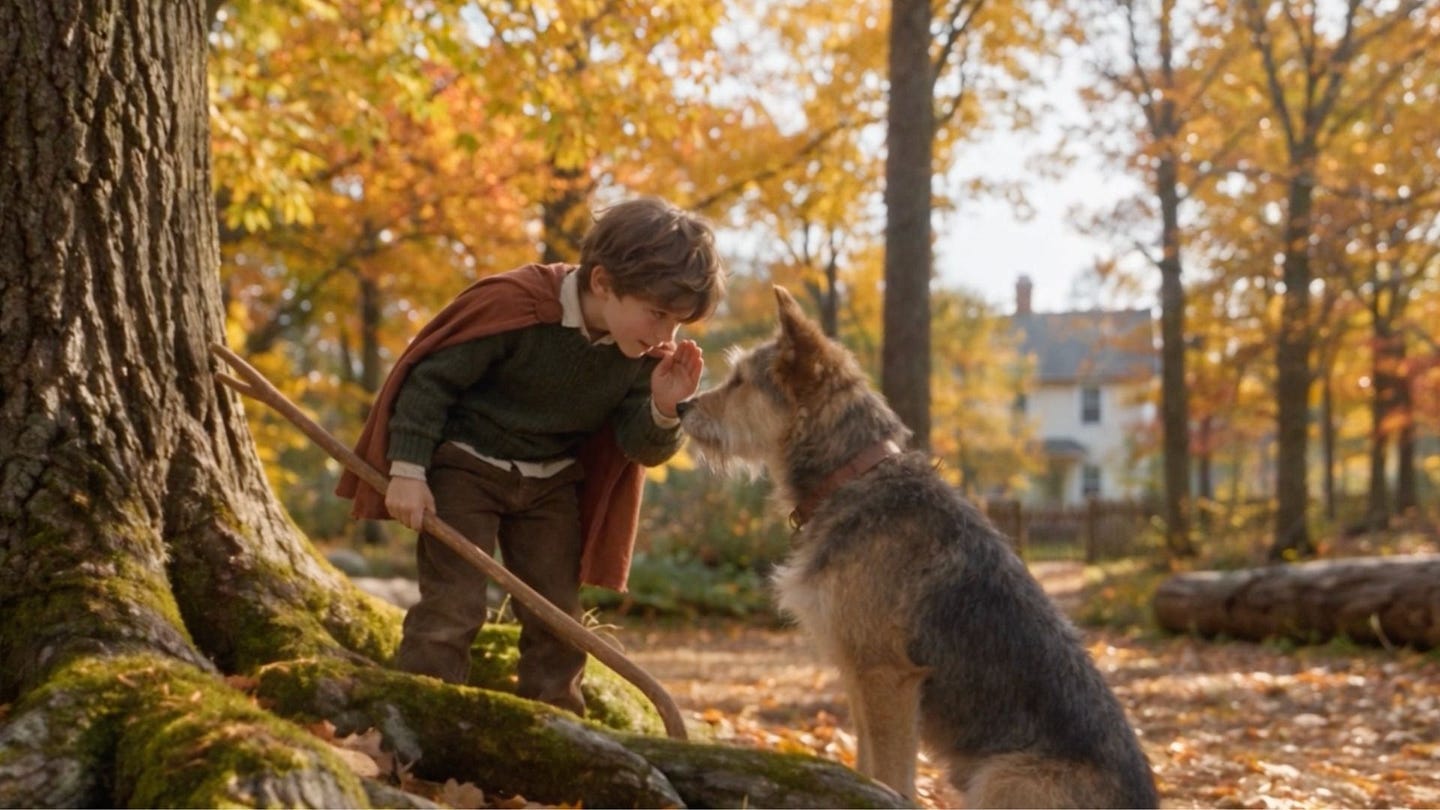
Prompt: story about an imaginative eight-year-old named Leo and his scruffy, endlessly patient rescue mutt, Barnaby. Set the scene on a crisp autumn afternoon where the two are exploring the woods behind their house, pretending to be brave knights on a quest to find a hidden treasure. Focus on the quiet, unspoken bond between them as Barnaby faithfully plays along, fetching magic sticks and guarding their cardboard-box castle, ultimately showing how a simple day of make-believe highlights the deep, comforting magic of a child’s friendship with their dog.

A new workspace will be created and the agent will start planning how the story and media assets will come together. It will also ask you a series of questions, so make sure to answer them in the floating chat interface at the right side of the workspace.
This is an important step. The agent wants to know exactly what kind of pacing and emotional tone you are aiming for, so giving it good answers here saves you a lot of editing time later.
Slowly, as you answer the questions and the story becomes more clear to the agent, scenes start to appear as nodes on the center of the screen.

Watching the nodes connect in real time gives you a great visual representation of how the AI is structuring your narrative.
In many months of using Topview’s Canvas tool, here are some of the major improvements I’ve noticed after switching to GPT 6 Astra.
Better scenes and dialogues: I’ve noticed a big improvement in the quality of the stories the agent generates. It’s asking the right questions and I noticed that I have less tweaking to do than before. The dialogue actually sounds like something humans would say instead of the usual stiff robotic lines we get from older models.
Faster generation: This is probably one of the best improvements. The faster story generation keeps my creative flow consistent and I can do more videos than before. When you do not have to sit around waiting for ten minutes just to see a script draft, you can experiment with completely different concepts on the fly.
More control: As I’ve said, Astra is asking the right questions here. For example, I noticed that it asked me if I wanted to do a micro film, a short emotional story, or a full feature film. This didn’t happen before, so I am glad that it asks me this and does all the needed work for me. It basically acts as an assistant director that anticipates what the project needs.

I continued with the next series of steps, like storyline confirmation, script writing, and finally the scene generation.
Here is a sample scene created by Astra:
Scene: late afternoon EXT cardboard castle in Autumn Woods Behind the House
Cast: Leo — Woodland Knight ; Barnaby — Patient Rescue Mutt
Use Leo — Woodland Knight
for eight-year-old Leo’s face, tousled brown hair, moss-green sweater, brown trousers and boots, and russet play cape. Use Barnaby — Patient Rescue Mutt
for his rescue dog’s medium-sized build, scruffy tan-and-charcoal coat, asymmetrical ears, and collar. The character sheets supply appearance, not panel layouts. Autumn Woods Behind the House
supplies the leaf-covered clearing, oak, homeward path, geography, and autumn daylight, now gently later in the same afternoon. Leo and Barnaby’s Cardboard Castle
supplies the brown box den, broad arched entrance, doorway flap, tape repairs, right-hand square window, crayon shields, and uneven battlements. The castle stands on the level patch beside the oak as in the earlier memory; ignore its reference image’s plain background. Leo brings the same ordinary brown bark-covered crooked stick, forked at one end, back from the quest.This is what the nodes should look like on your screen:

Here’s a sample scene generated with Seedance 2.5:
Pretty cool, right? Now, continue to generate the rest of the scenes and let the agent stitch them all together to produce the final video. You can sit back and let the platform do the heavy lifting.
Awesome! I was able to create this lovely video in less than 30 minutes with GPT 6 Astra and Seedance 2.5. The quality is so good, and their facial expressions capture the essence of the dialogue perfectly. The scene transitions are great, every scene looks contextually correct, and the story is short but very well executed.
Crazy to think how many days this would take for an artist without access to these AI models. You would normally have to render every single frame, check the lighting, and manually adjust the character rigs just to get five seconds of usable footage.
Why should you care?
A few years ago, making a two-minute animated short with two consistent characters, an autumn woodland set, and matching lighting across every shot meant a small team and a few weeks. Storyboard artist, character designer, animator, editor.
Most people with an idea for a story simply never made it, because the gap between having the idea and having the skills was too wide to cross on a weekend. Those difficult and manual parts of the process are mostly gone now, and I don’t think we’ve fully processed what that means.
For filmmakers, the biggest win is iteration. You can try a version of a scene, look at it, decide it’s wrong, and try another one in the time it used to take to book a session. The cost of a bad idea went from expensive to nearly free.
For content creators and marketers, it drastically simplifies the production pipeline. No handoffs between the person who writes the script, the person who makes the assets, and the person who edits. Whether that’s a good thing depends on where you sit, and I understand why it makes people nervous.
But one of the most fun and simple use cases I can think of is one-shot short films like the one in this article. A parent making a short film starring their own kid and their own dog. Personal storytelling used to be limited to what you could photograph or write down. Now a bedtime story your kid invented can become a film they watch, with a character that looks like their actual pet.
To be clear, I am not advocating for a complete use of AI in various creative workflows. Human touch and creativity still matter a lot. Knowing what makes a scene land, where to cut, and why one shot follows another is still the difference between a video and something worth watching.
The tools got faster. Taste didn’t get automated.
Other use cases of GPT 6 Astra
Canvas isn’t the only place Astra is integrated in Topview. The same agent runs across the other tools, and each one is built for a different shape of project.
Drama Studio is for longer form. Short dramas, micro-dramas, vertical dramas, episode-style story videos built from a novel, a script, or a rough plot. The agent plans characters, scenes, props, prompts, continuity, and dialogue before generation starts. If your problem is producing several connected episodes efficiently rather than perfecting one shot, this is the tool.
You can learn more about Topview’s Drama Studio in the article below.
https://generativeai.pub/the-fastest-way-to-create-an-ai-series-with-a-one-person-drama-studio-c40cedc60737
Film Studio goes the other way. It’s the cinematic suite, and it’s the right fit when the project depends on precise framing, performances, and how one shot connects to the next. Both Drama Studio and Film Studio run on Seedance 2.5, so the output quality is the same. The difference is how much control the interface gives you.
Learn more about Topview’s Film Studio below.
https://generativeai.pub/how-topview-is-enabling-a-new-form-of-storytelling-and-filmmaking-via-ai-agents-e0b1d6f226c6
The Marketing Video Agent is where Astra’s research ability actually pays off. Drop in a product URL, and the agent researches the product, plans the scenes, picks the models, generates the assets, and keeps everything editable on Canvas. For brainstorming campaign angles, it’s useful because a model that’s good at research is doing something different from a model that’s good at writing ad copy.
Motion Studio is the newest one, and the pitch is creating motion videos with AI instead of After Effects. Same Astra agent working out the best way to animate something for your brand or product.
There’s also a 3D Shot Composer in Canvas for blocking camera angles before you generate anything, and Clip Edit for adjusting one part of a video without rebuilding the whole thing. Worth poking at once you’ve got the basics down.
Check out my coverage about the 3D Shot Composer feature below.
https://generativeai.pub/i-tried-topviews-3d-shot-composer-for-more-precise-ai-images-3e458a7c76e9
Final Thoughts
So that’s a full example of how you can create a short film with AI using the new GPT 6 Astra model.
This article went through what changed in Astra, how to set it as your agent model inside Topview, and then built an actual film start to finish.
I showed you how a prompt about a boy and his dog turned into a storyline, then a script, then scene descriptions detailed enough to keep both characters consistent, then a finished video generated with Seedance 2.5 and stitched together automatically. Under 30 minutes, in a browser, with no editing software open.
Thanks to Topview for building tools like Canvas that let creators put something like this together from a laptop. The difference between “I have an idea for a story” and “I have a film” used to be huge, and watching it close this fast has been one of the most fun parts of covering this space.
What do you think about the new GPT 6 Astra model? Have you tried it inside a video workflow yet, or are you still using it mostly for code and writing? Let me know in the comments.
Hi there! Thanks for making it to the end of this post! If you enjoyed this content and would like to support my work, consider becoming a paid subscriber. Your support means a lot!

