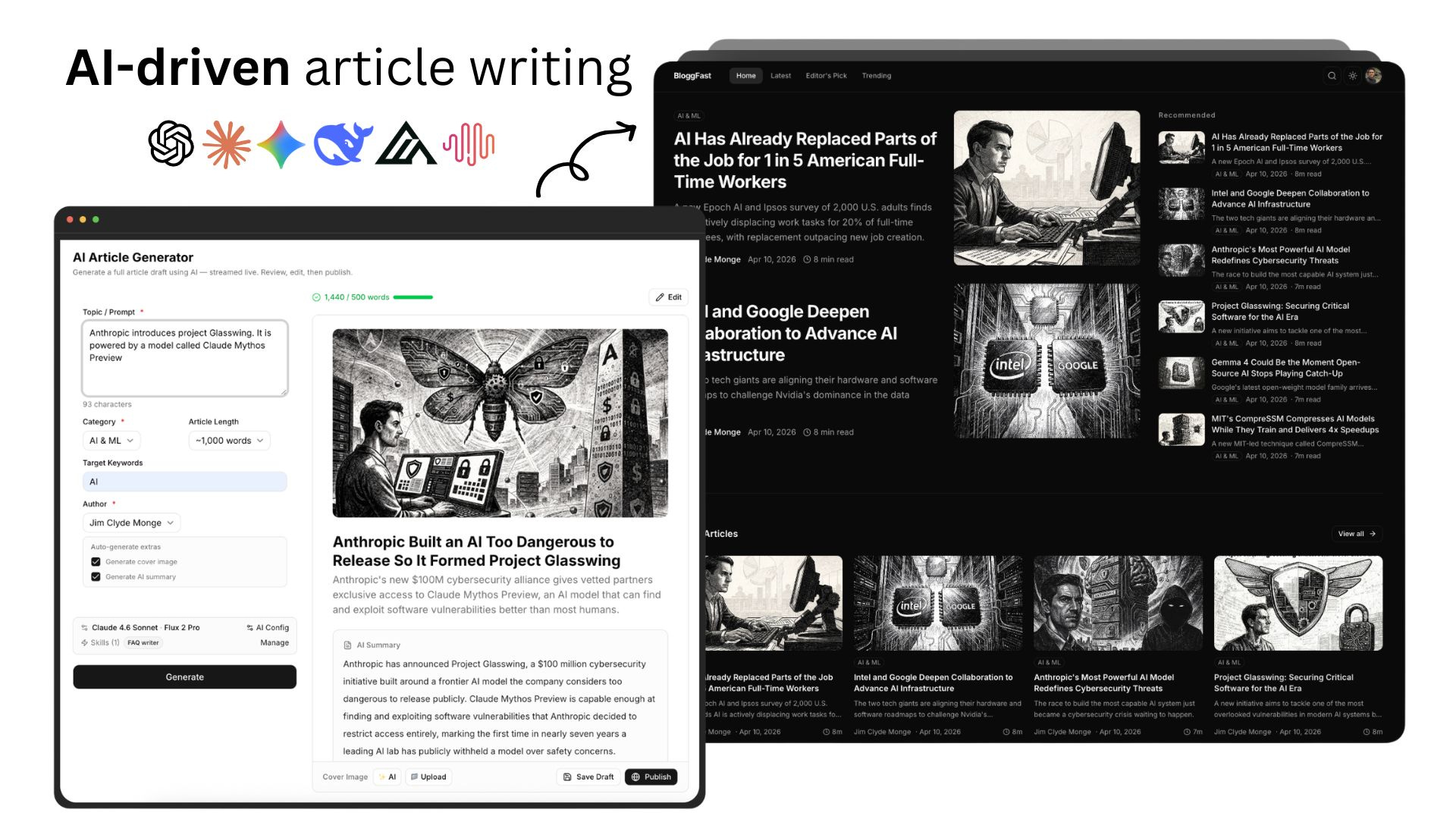
I Built a Full-Stack AI-Driven Blog and News Website Boilerplate
BloggFast is a premium Next.js boilerplate for launching AI-driven blog and news platforms without starting from scratch.
Back in 2024, I had the idea of building my own blog site from scratch.
It is not that I do not enjoy platforms like Medium or Substack. I actually like using them. But at the end of the day, I still do not have full control over the website. I cannot fully customize the UI or UX the way I want, and I am limited by the platform’s system and design decisions.
I also tried building with tools like Webflow and Framer, but I ran into the same issue. They are convenient, but there is still a ceiling when it comes to flexibility and control. On top of that, the monthly subscriptions can add up, and pricing changes are never fun to deal with.
So about a month ago, I decided to stop working around those limitations and just build the thing myself.
That is how BloggFast started.
What is BloggFast
BloggFast is a premium Next.js boilerplate that gives you a fully wired, production-ready AI-powered blog platform out of the box. Instead of spending weeks integrating authentication, a database, a CMS, email, and AI services, you get all of that configured and connected on day one.

I built BloggFast for people who want to launch a serious blog, news site, or content platform without wasting time on repetitive setup work. In my opinion, this is where most developers and creators lose momentum. The excitement is there at the beginning, but once you realize how many moving parts you need just to get a modern content site running, it becomes exhausting very quickly.
The philosophy is simple: buy, configure, ship. You focus on your content and brand, not infrastructure.
This is what the final news/blog website looks like:
You can explore the demo here => https://demo.blogg.fast
Why I Built BloggFast
Personally, I think ownership matters a lot more than people realize. When you own the codebase and the platform, you are free to shape the product however you want. You are not waiting around for another company to add the feature you need. You are not stuck with someone else’s pricing model. And you are not limited by a platform’s built-in design decisions.
Here are the main reasons I built BloggFast:
There is nothing quite like it on the market right now. Most AI-driven writing platforms ask you to pay for a recurring subscription while keeping you inside their ecosystem. I think owning the platform is simply the better long-term move.
I wanted to help creators publish content faster. AI models are only going to get better at writing, summarizing, researching, and structuring ideas. This product will evolve along with all the AI progress.
I also see BloggFast as an evolving product. Over time, I want it to include the best parts of platforms like Sanity, Buffer, Medium, and Substack. It gets tiring having to jump between tools or request features from one platform that only exist in another. My goal is to bring the strongest publishing features together into one solid boilerplate.
Another reason is that I wanted to push both my AI workflow and my agentic coding skills further. I have been building products with AI for the past three years, and BloggFast is where I am putting a lot of the best ideas, patterns, and lessons I have learned so far.
And of course, I built it to make money too. I would be lying if I pretended otherwise. I make software products for a living, so monetizing something useful that I genuinely believe in is part of the plan.
The Tech Stack
One of the things I care about most when building a product is choosing tools that are practical, modern, and reliable in production.
That is why I picked a stack that is both developer-friendly and scalable. Every tool here serves a purpose: for performance, developer experience, content management, or AI integration.
Here’s the overview of all the provider stack:
Next.js 16: App Router, React Server Components, and the latest React 19 features.
Vercel: Easy deploys on Vercel with seamless AI model integration through the Vercel AI Gateway and AI SDK.
Neon Auth: Passwordless and social login, user management, and sessions built in.
Neon Database: Serverless Postgres that scales to zero. Branching for dev/staging.
Prisma ORM: Type-safe database access with auto-generated queries and migrations.
Sanity IO: Headless CMS with real-time collaboration and a customizable studio.
Multiple selectable LLMs: Including Claude 4.6 Sonnet, Claude 4.6 Opus, GPT-5, Gemini 3.1 Pro, DeepSeek, and Minimax — configurable from the admin dashboard for article generation.
AI Image models: Generate blog cover images with Nano Banana Pro, GPT-image-1.5, or Flux Pro in multiple aspect ratios, directly from the article editor.
Cloudflare: Edge-ready asset delivery and storage support for media, uploads, and performance.
Resend: Transactional emails for welcome flows, notifications, and newsletters.
TypeScript: Fully typed codebase. Catch bugs at build time, not in production.
It is modern without being overly experimental, and powerful without becoming unnecessarily complicated.
Setting up BloggFast
Getting started with BloggFast is straightforward. There are two ways to get the boilerplate:
Download the project as a *.zip file.
Become a member of the private GitHub repo and get access to lifetime updates to the project.
If you choose the GitHub option, I recommend forking the project first and making sure your fork stays synced with the remote repository.
Here’s the project layout:
bloggfast/
├── prisma/
│ ├── schema.prisma # Full database schema (17 models, 6 enums)
│ └── seed.ts # Seed script for initial data
├── public/ # Static assets (images, fonts, icons)
├── sanity/
│ └── schemas/ # Sanity content type definitions
│ ├── post.ts # Blog post schema
│ ├── author.ts # Author schema
│ ├── category.ts # Category schema
│ └── index.ts # Schema registry
├── src/
│ ├── app/
│ │ ├── (marketing)/ # Public blog pages
│ │ │ ├── page.tsx # Homepage with article feed
│ │ │ ├── article/[slug] # Individual article pages
│ │ │ ├── category/[slug]# Category listing pages
│ │ │ ├── tag/[slug]/ # Tag listing pages
│ │ │ ├── author/[slug]/ # Author profile pages
│ │ │ ├── latest/ # Latest articles
│ │ │ ├── trending/ # Trending articles
│ │ │ ├── editors-pick/ # Editor’s pick articles
│ │ │ ├── search/ # Search page
│ │ │ └── layout.tsx # Marketing layout (navbar + footer)
│ │ ├── (admin)/ # Protected admin dashboard
│ │ │ ├── admin/
│ │ │ │ ├── page.tsx # Dashboard overview + stats
│ │ │ │ ├── articles/ # Article list, create, edit
│ │ │ │ ├── categories/ # Category management
│ │ │ │ ├── authors/ # Author management
│ │ │ │ ├── tags/ # Tag management
│ │ │ │ ├── subscribers/ # Email subscriber management
│ │ │ │ ├── generate/ # AI article generator
│ │ │ │ ├── generation-history/# AI generation history
│ │ │ │ └── settings/ # Site & AI settings
│ │ │ └── layout.tsx # Admin layout (sidebar nav)
│ │ ├── (app)/ # Authenticated user pages
│ │ │ ├── profile/ # User profile page
│ │ │ ├── saved/ # Saved articles
│ │ │ ├── liked/ # Liked articles
│ │ │ └── layout.tsx
│ │ ├── (auth)/ # Auth pages
│ │ │ ├── sign-in/[[...stack]]/ # Sign in page
│ │ │ ├── sign-up/[[...stack]]/ # Sign up page
│ │ │ └── layout.tsx
│ │ ├── auth/[path]/ # Custom auth path handler
│ │ ├── studio/ # Embedded Sanity Studio
│ │ │ ├── [[...tool]]/ # Catch-all for Studio routes
│ │ │ └── layout.tsx # Studio layout
│ │ ├── api/ # API route handlers
│ │ │ ├── auth/ # Neon Auth API endpoints
│ │ │ ├── generate/ # AI article generation endpoint
│ │ │ ├── generate-image/# AI cover image generation endpoint
│ │ │ ├── search/ # Article search endpoint
│ │ │ ├── subscribers/ # Email subscription endpoints
│ │ │ ├── views/ # Article view tracking endpoint
│ │ │ ├── rss/ # RSS feed endpoint
│ │ │ └── webhooks/ # Resend webhook handler
│ │ ├── layout.tsx # Root layout (providers, fonts, theme)
│ │ ├── globals.css # Global CSS with Tailwind v4 imports
│ │ ├── sitemap.ts # Dynamic sitemap generation
│ │ ├── robots.ts # robots.txt configuration
│ │ ├── error.tsx # Global error page
│ │ ├── loading.tsx # Global loading UI
│ │ └── not-found.tsx # 404 page
│ ├── components/ # Reusable UI components
│ │ ├── ui/ # shadcn/ui base components
│ │ ├── admin/ # Admin dashboard components
│ │ ├── articles/ # Article card, detail, engagement
│ │ ├── layout/ # Navbar, footer, sidebar, theme toggle
│ │ ├── search/ # Search modal and input
│ │ ├── providers.tsx # App-level context providers
│ │ └── subscribe-form.tsx # Newsletter subscription form
│ ├── actions/ # Next.js Server Actions
│ │ ├── articles.ts # Article CRUD operations
│ │ ├── admin.ts # Admin-specific operations
│ │ ├── ai-settings.ts # AI configuration operations
│ │ ├── engagement.ts # Engagement tracking
│ │ └── subscribe.ts # Subscription management
│ ├── lib/
│ │ ├── db/
│ │ │ ├── index.ts # Prisma client singleton (Neon adapter)
│ │ │ └── queries.ts # Database query functions
│ │ ├── ai/
│ │ │ ├── generator.ts # Article generation with OpenAI
│ │ │ ├── prompts.ts # System prompts for AI generation
│ │ │ └── ai-settings-schema.ts # AI settings Zod schema
│ │ ├── auth/
│ │ │ ├── neon-server.ts # Neon Auth server-side client
│ │ │ ├── neon-client.ts # Neon Auth client-side hooks
│ │ │ └── server.ts # Auth helper functions
│ │ ├── sanity/
│ │ │ ├── client.ts # Sanity client + image URL builder
│ │ │ └── queries.ts # GROQ query functions
│ │ ├── resend.ts # Email sending functions (Resend)
│ │ ├── unified-queries.ts # Cross-source article queries
│ │ ├── article-utils.ts # Article helper utilities
│ │ ├── constants.ts # Shared enum constants
│ │ └── utils.ts # General utilities
│ ├── sanity/ # Sanity runtime config (imported by Studio)
│ │ ├── schemaTypes/ # Portable Text content type definitions
│ │ ├── lib/ # Sanity client, image, live helpers
│ │ ├── structure.ts # Studio structure config
│ │ └── env.ts # Sanity environment variables
│ ├── types/ # Shared TypeScript type definitions
│ ├── hooks/ # Custom React hooks
│ ├── env.ts # Type-safe env validation (@t3-oss/env-nextjs)
│ └── middleware.ts # Auth middleware (protects /admin, /profile, etc.)
├── .env.example # Environment variable template
├── next.config.ts # Next.js config (React Compiler, image domains)
├── sanity.config.ts # Sanity Studio config file
├── sanity.cli.ts # Sanity CLI config
├── prisma.config.ts # Prisma config
├── components.json # shadcn/ui component registry config
├── package.json
└── tsconfig.jsonOnce you have the project on your local machine, unzip it and follow the documentation page.
Make sure all environment variables are configured correctly and that the build passes successfully. After that, run the database seed to populate the app with temporary sample data, then start the development server with npm run dev.
Once everything is working, open http://localhost:3000/ and you should see the following screen:
At this point, you already have a working foundation. That is a huge difference compared to starting from scratch, where even getting to this stage can take a lot of time.
In the next section, I will walk through the admin pages and show how article generation works with AI.
BloggFast’s Admin Pages
The admin side of BloggFast is where you control the platform: from managing articles and settings to configuring AI models and custom skills.
First, there is the Dashboard page, which gives you a summary of the articles that have already been created. From here, you can quickly edit existing content or generate a new article.
Take note that the admin page is only accessible to users with an Editor or Admin role. In the Neon database table, you can set which user is an admin or editor.
In the Settings page, you can configure your AI model providers. Right now, I have added support for frontier models such as GPT-5, Claude 4.6 Sonnet, Claude 4.6 Opus, DeepSeek V3, and MiniMax M2.7.
For image generation, I added support for Flux 2 Pro, Nano Banana Pro, and GPT-Image-1.5. Based on my own testing, the best combination so far is Claude 4.6 Sonnet for writing and Flux 2 Pro for images.
Another feature I am really happy with is the ability to add customizable AI skills. Inside the AI Skills tab, you can create a new skill and describe exactly how it should behave. For example, the FAQ writer skill shown in the screenshot below automatically adds an FAQ section to the end of every article.
You can also enable or disable multiple skills at the same time.
Alright, now let’s move on to the AI article generator.
Generating articles
Open the AI Generator tab. This is what the dashboard looks like:
In the prompt field, describe the article you want to generate. Then set the additional parameters such as article length, category, author, and whether you want to automatically generate a cover image and AI summary.
Here’s an example topic:
Prompt: Alibaba claims viral happy horse AI model in latest breakthrough
In as little as 15 seconds, you get a well-researched output complete with reference links, an AI summary, and a cover image.
From there, you can publish the article immediately or manually refine it by clicking the Edit button in the upper-right corner.
I also made sure the editor supports more than just plain text. You can insert images, videos, and documents into the article, and URLs are rendered properly.
For devs, you can also add code blocks in any programming language, which makes the platform flexible enough for technical writing too.
Files such as images and videos are uploaded to Cloudflare R2 instead of being stored as Vercel blobs. That decision matters a lot because it helps reduce storage costs and improves performance at the same time.
The uploaded files are also organized cleanly inside the R2 bucket and synced with the Neon database.
This is what the published article looks like:
And just like that, a complete blog post about Alibaba’s new HappyHorse Video AI model can be published in under a minute. If I had done the whole thing manually, it probably would have taken me at least an hour.
That speed is exactly why I believe tools like this are worth building. They do not replace taste, editing, or good judgment, but they absolutely remove a lot of repetitive work.
You can read the published article here => https://demo.blogg.fast/article/alibaba-reveals-it-built-the-viral-happyhorse-video-ai-model
Check out the video below to see a more detailed process of how the article generation with AI works:
A few things to remember
Before wrapping up, I want to answer a few common questions that people usually have when they see a product like this for the first time. I think it is important to be clear about what BloggFast is, what you actually get, and who this product is best suited for.
What do I get exactly? You get the complete source code for a production-ready AI-powered blog built with Next.js 16. This includes authentication, database setup, CMS integration, AI article generation, email system, and beautiful UI components.
How often is BloggFast updated? I ship updates regularly — typically every 1–3 days. Updates include new features, dependency upgrades, security patches, and improvements based on customer feedback.
Is this a website template? No, BloggFast is much more than a template. It’s a fully functional Next.js application with backend logic, database schemas, API routes, authentication, CMS integration, and AI-powered content generation. Think of it as a complete product you can customize and deploy — not just a static design.
JavaScript or TypeScript? BloggFast is built entirely in TypeScript for maximum type safety and developer experience. Every component, API route, and utility is fully typed. If you prefer JavaScript, TypeScript is fully compatible — you can gradually adopt it or remove types as needed.
Can I use this for multiple projects? Yes! Your license covers unlimited projects for personal or commercial use. Build as many blogs, news sites, or content platforms as you want. No per-project fees, no recurring charges.
Do I need to know Next.js to use this? Basic familiarity with React and Next.js is helpful, but you don’t need to be an expert. The codebase is well-structured and documented. Most customizations — like changing colors, content, and branding — are straightforward. For bigger changes, Next.js knowledge will help you get the most out of the boilerplate.
Final Thoughts
To wrap things up, BloggFast is the product of everything I discussed in this article: the idea of owning your platform, moving faster with AI, and having full control over how your blog or news site looks and works.
I built it because I wanted a better alternative to the usual publishing platforms and subscriptions. I wanted something that creators, developers, indie makers, and founders could actually own and customize without being locked into someone else’s ecosystem.
BloggFast is for people who have always wanted to launch their own content platform but did not want to spend weeks or months wiring everything together from scratch.
One of the things I really wanted to achieve with this product was simplicity. Setup is straightforward, the stack is already connected, and the app gives you the tools to generate articles, manage content, customize AI workflows, and launch a production-ready blog much faster than doing everything manually.
The bigger idea here is freedom.
Instead of paying ongoing platform fees and adjusting your workflow around other companies’ limitations, you can build and grow a site that is fully yours. If you want to launch a personal blog, a niche media site, a newsletter-driven publication, or an AI-assisted content business, BloggFast gives you a really good starting point.
Right now, I am offering BloggFast at 50% off, so this is a great time to try it out and see what you think. If you run into any issues or have questions, feel free to email me at jimclydegm@gmail.com for support.
Thank you so much for the continued support. I really appreciate it.
Check out BloggFast now => https://www.blogg.fast
Hi there! Thanks for making it to the end of this post! If you enjoyed this content and would like to support my work, consider becoming a paid subscriber. Your support means a lot!


