

As a dev and technical writer, I often read whitepapers and AI-related research for the articles I write. Usually, there’s a number I want to check or a detail about how a model was tested. I hardly ever use AI to verify those things. I’m always a little worried it’ll make something up and I’ll end up repeating it in my article.
You see, there’s a reason why some university instructors have banned the use of AI on assignments. Harvard’s CS50 instructors, for example, allow the course’s own AI tools but restrict students from using ChatGPT or Claude to suggest answers or finish code.
The rules make an exception for students’ own final projects.
In a 2023 study published in Scientific Reports, researchers asked GPT-3.5 and GPT-4 to write short literature reviews, then looked up the 636 references the two models gave them.
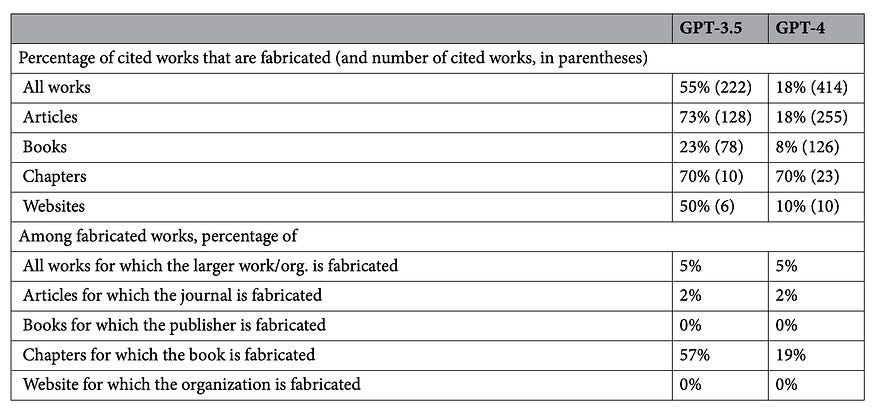
In the GPT-4 reviews, 18% of the references were made up. Even among the references to real works, 24% had a substantive error.
So, tech experts have worked hard over the years to improve LLMs’ research capabilities and avoid hallucinations and gather reliable sources in their output.
As an example, SciSpace is opening early access to an API that lets you run its research agent inside your own app. I want to see how well it can get me from a question to the right page in a paper.
What is the SciSpace API?
SciSpace is an AI-powered research platform designed to help students, academics, and researchers discover, read, analyze, and write scientific literature more efficiently.
It indexes a massive database of over 280 million research papers and acts as an intelligent copilot through every stage of the academic workflow.
You can learn more about SciSpace in the article below:
https://generativeai.pub/the-best-ai-research-assistant-for-end-to-end-citation-backed-scientific-research-89419a0bd242
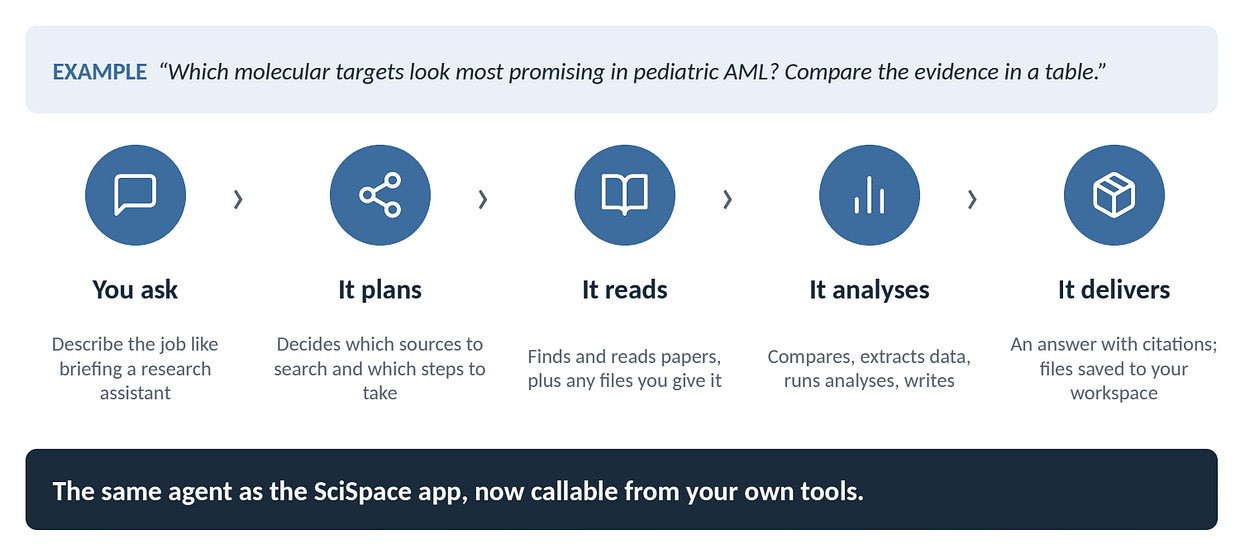
The SciSpace API gives developers access to the same agent SciSpace uses for research tasks. You can call it from your product, an internal tool, or another AI agent.
SciSpace has split the API into Search and Task, and your app can use either one on its own.
Search API: send any research question in plain language and get back a list of papers, each with all its relevant details.
Task API (the agent): send any research task, like a literature review, systematic review, extraction table, report, or deck, and get back links to every file the agent made, plus a text answer.
We’ll get into the details of each part below.
Search API
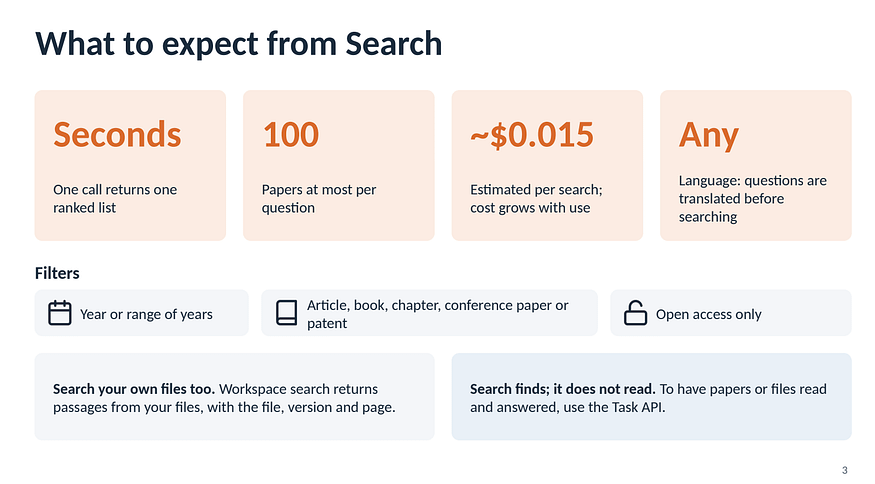
The Search API takes a question in plain language and returns up to 100 papers ranked by relevance. The records can include titles, abstracts, publication venues, DOIs, and links to open-access PDFs.
There are filters for things like publication year and open-access status, and the preview says you can send queries in multiple languages.
Key features of SciSpace API:
Multilingual. Query in Japanese, Spanish, or any other language and get relevant papers back.
Filters as parameters. Limit results by publication year (for example, the last two years), open access only, or source type such as conference papers or patents.
Fast and low cost. Search is the API’s only job, so calls finish in seconds at the lowest price point.
Here’s a quick summary of what you can do with the Search API:
Suppose I ask this question as a parameter to the API:
How well do language models use information buried in the middle of a long document?
Take this paper, Lost in the Middle, as an example. The authors tested models on multi-document question answering and key-value retrieval. In their experiments, performance was often better when the relevant information appeared near the beginning or end of the input.
I know what that paper tested, so it gives me a way to judge the results.
Does it show up? Do the other papers actually test where the information appears in the input?
I could see a paper about a model’s maximum context length coming up in the search. For this question, I’m looking for experiments that move the relevant information around and measure what happens.
As a developer, I like getting the paper records directly. For a research panel inside an editor, I could show the abstract and a link to the PDF, then let the writer save the paper beside the draft.
I would also show the year and publication venue. When I’m looking at two versions of a paper, those are among the first details I check.
Lost in the Middle has a 2023 arXiv version and a 2024 journal version. If both are returned by the API results, I want the app to show that they’re versions of the same work. I can still pick the one I read and save that link. When I ask the agent to compare the evidence later, I want it to count the work once.
SciSpace says its paper index is updated monthly. When I’m covering a model on release day, I’d still go to the announcement or arXiv for the paper that just went up. Search is where I can look for earlier work that helps me explain what changed.
Task API
The Task API, as the name suggests, performs a research assignment. You can ask it to look for papers, screen them against your criteria, extract details, and write up what it found.
You can ask a question like:
“Which molecular targets look most promising in pediatric AML? Compare the evidence in a table.”
You might also ask for a table that shows the model version, the length of the input, and the score when the relevant information was at the beginning, middle, or end.
I would give the agent one more instruction for that table. When a paper leaves out a detail, mark it as “unreported.” For example, if the authors give the model name but leave out the version, I want to see that before I compare its score with another paper’s.
According to SciSpace, the Task API supports 19 types of research tasks, so a developer can change the assignment without integrating a separate endpoint for every kind of research.
Sources beyond the paper index. SciSpace says its index covers over 280 million papers. The agent can also draw on Google Scholar, PubMed, and arXiv.
Several files from one task. The API can return a text answer and links to the files the agent created. You can ask for a Word report and a PowerPoint deck together.
Live progress and follow-ups. The agent streams its plan and progress while it works. Once it finishes, you can use the same thread to ask for another column in the table or a different file format.
A fixed workflow for systematic reviews. SciSpace offers a predefined review workflow that follows a set sequence of steps. That gives a team a way to run the same kind of review again without writing a fresh brief for the agent every time.
These are just some of the features that SciSpace API offers, which I believe could help a lot of researchers and technical writers like me. I have been using Google’s Gemini Notebook for months, and I think this new API could make me switch.
SciSpace says it can read over 50 million open-access papers as well as PDFs you give it. When a paper is paywalled, I want the answer to show me which details came from the abstract.
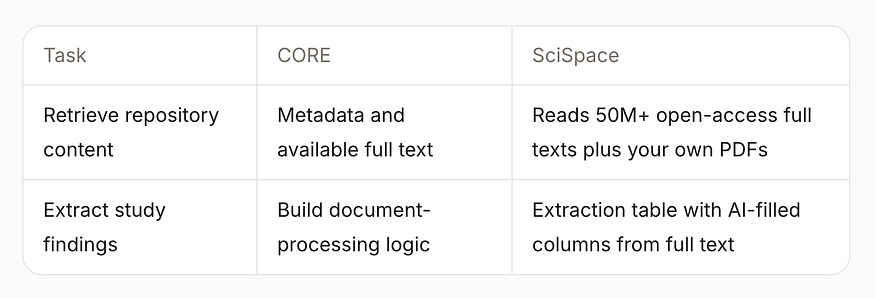
For papers you already have, SciSpace describes questions across up to 10 PDFs with page-level citations.
Say two papers report results for a model with the same name. I could ask which checkpoint each team used and open the cited page in each PDF.
The agent runs the task without stopping for clarifying questions.
Tell it up front to separate results on synthetic retrieval tests from results on multi-document question answering. I can ask it to reorganize the table later, but I would rather give it that distinction before it starts looking for papers.
I would also ask for a CSV for the benchmark table. That lets my app sort the results and flag missing values. I’ll keep a DOI or paper link in every row, even when the table only has a few entries. Otherwise, somebody can copy a row out of the table and lose the reference that goes with it.
Demos and examples
For a video about science, I would use SciSpace before writing the script.
The Search API can find papers on the question you want to answer. The Task API can pull the findings into a table with links to the original studies. That gives you something to check as you decide what to say in the voiceover and what to show on screen.
Here are some examples:
Science and health explainers.
Start with one question and ask SciSpace who was studied and what the researchers measured. You can turn one finding into a chart or diagram and cite the paper on screen.
I can see teachers and college students using this for class presentations. For an educational YouTube video, I like the idea of building the explanation around one diagram and showing viewers where the research came from.
2. Product videos and marketing.
Pick an ingredient customers ask about and look up the research behind it. I would show it on the label and explain what the study tested. Check if the researchers studied the ingredient by itself or the actual formula before using the result in a product claim.
This is useful for business owners and marketers making a product walkthrough or a campaign video. Give SciSpace the ingredient list and explain how the product is used. It can find studies that are relevant to what you want to say about it.
3. Educational videos.
Use SciSpace to find papers for a lesson built around a comparison. For an evolution lesson, you could compare the same bone in two species, then use the papers to check the details before you make a labeled diagram or animation.
I like this format for interactive explainers. You can use the API to pull up a relevant paper when someone clicks on part of a diagram, so they can spend more time on the part they’re curious about.
You can also do faceless videos like these examples:
This fasting versus calorie restriction example shows how you can ask for a video through the Windows command prompt. As a developer, I like that you can show the actual request on screen, then cut to the generated video so viewers can see what came out of it.
I can also see this working as a quick tutorial for students who need to write a report in LaTeX. Show a few lines of the source, then open the generated PDF and zoom in on the part those lines produced.
Another example shows SciSpace putting together a table on GLP-1 drugs and kidney outcomes in 38 seconds. For a science explainer, I would keep the generation short in the edit and spend more time on one row. Who was studied, and what did the researchers actually measure?
API access and free credits
Early access is open now.
You can request it through the early-access form. SciSpace says the API will be open to anyone at launch, and you’ll be able to register without a sales call.
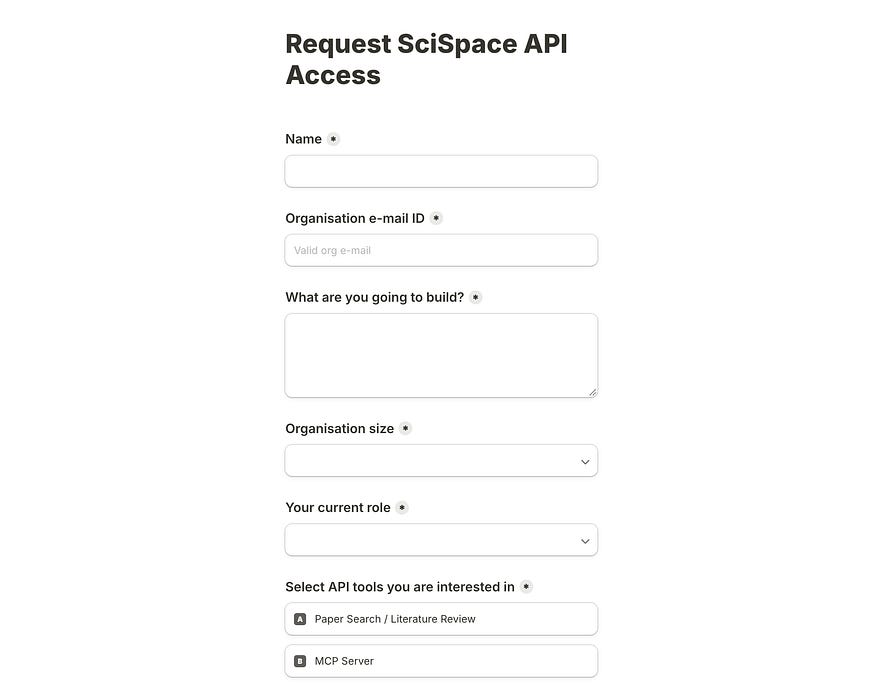
New accounts get $5 in free API credits on registration. Search and Task use the same pay-as-you-go balance. The API has its own billing, separate from SciSpace’s consumer plans.
In SciSpace’s pricing preview, a Search call is estimated at $0.015 for up to 100 papers. A light Task call, like asking a question about one paper, is estimated at $0.02. SciSpace estimates around $1 for a deep task such as a systematic review or a multi-page report.
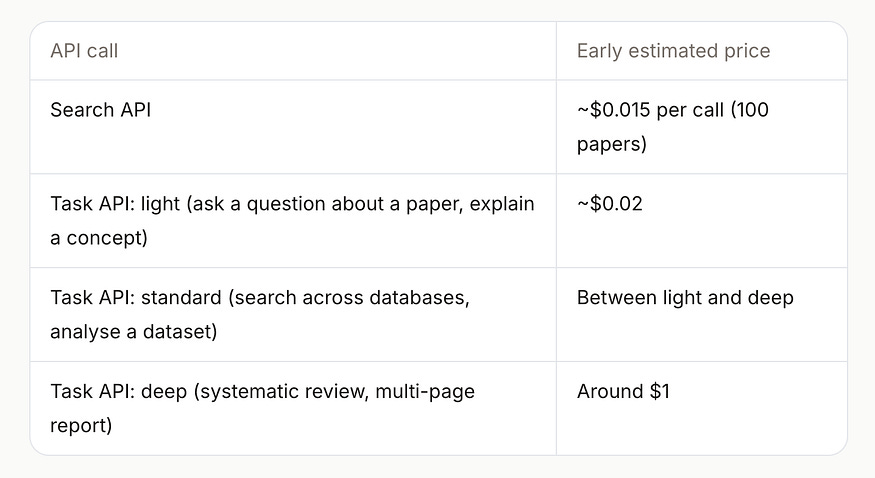
The company also describes a standard category for work like searching several databases or analyzing a dataset. These are early estimates and can change by launch.
At those rates, 20 searches and two deep tasks would use about $2.30.
It’s a good idea to use the credits on one topic I already know, so I can recognize papers the search should find. Then I’d run the same Task request twice with different dates and see if the evidence table reflects the change.
SciSpace says developers will have a playground for inspecting responses and a dashboard for checking usage.
Take a team running one deep report every week for each of 10 products. At the preview price of around $1 per report, that’s about $40 in Task calls over four weeks.
Who is it for and why should you care?
If you’re doing a bunch of technical research and need to fact-check, this is very useful. A lab that updates an evidence table every month already can also take advantage of this API. If you are a team building an AI assistant, you can do something like putting paper links beside the answers.
Here are some use cases and target users I can think of:
Developers and research products. Give your agent a way to look up papers and show the title, DOI, and source beside the answer. In an app with a reading list, you could let people select papers they want to compare before you call Task.
R&D teams and product leads. A formulation team could run a report on new papers, trial records, and patents for an ingredient it tracks. I would keep each kind of record labeled.
Universities and research institutions. A team could use it to organize the records and start an extraction table, then review the decisions about what to include.
Independent researchers and consultants. A consultant could use the same evidence table for a technical report and a shorter slide deck for a client.
A team that already has a folder of papers could bring it into SciSpace Workspaces and use it alongside published research.
Imagine updating last year’s review. Keep the papers from the original review and the results of the new search labeled separately so the team can see what it already checked.
It is also ideal to keep a copy of the request that produced each report. When someone asks six months later why a paper appeared in one edition and dropped out of the next, the two requests give you something to compare. The team may have changed the date range or narrowed the eligibility criteria.
For a company building a research feature, I can see the appeal of having search, PDF reading, and evidence extraction in one integration. Start with the part customers already ask for. A paper lookup with a good source view could be useful on its own.
Once people start asking to compare the papers they’ve saved, there’s a clear job for the agent.
Final Thoughts
That’s about it. I haven’t yet integrated or done a detailed experiment on the API, but I can see its appeal already.
The first thing I would probably test is an article I’ve already published. I know which papers I used and where I got the numbers. I can give SciSpace the same research question and see if it brings back the sources I ended up citing, along with anything I might have missed.
With Task, I’m curious about the evidence table. I want to pick a row and get to the page that supports it. If I can do that for the details I’m using, I can spend more of my time reading the parts of the papers that change what I write.
I’m glad SciSpace is making the agent available through an API. As a developer, it’s incredibly useful for me to put that source check next to my draft. When I’m editing a sentence about a benchmark, I want to open the paper from there and see the original table.
If there’s a research question you already know well, bring that to the preview. Early access is now open to the public.
Let me know what you think!
Hi there! Thanks for making it to the end of this post! If you enjoyed this content and would like to support my work, consider becoming a paid subscriber. Your support means a lot!