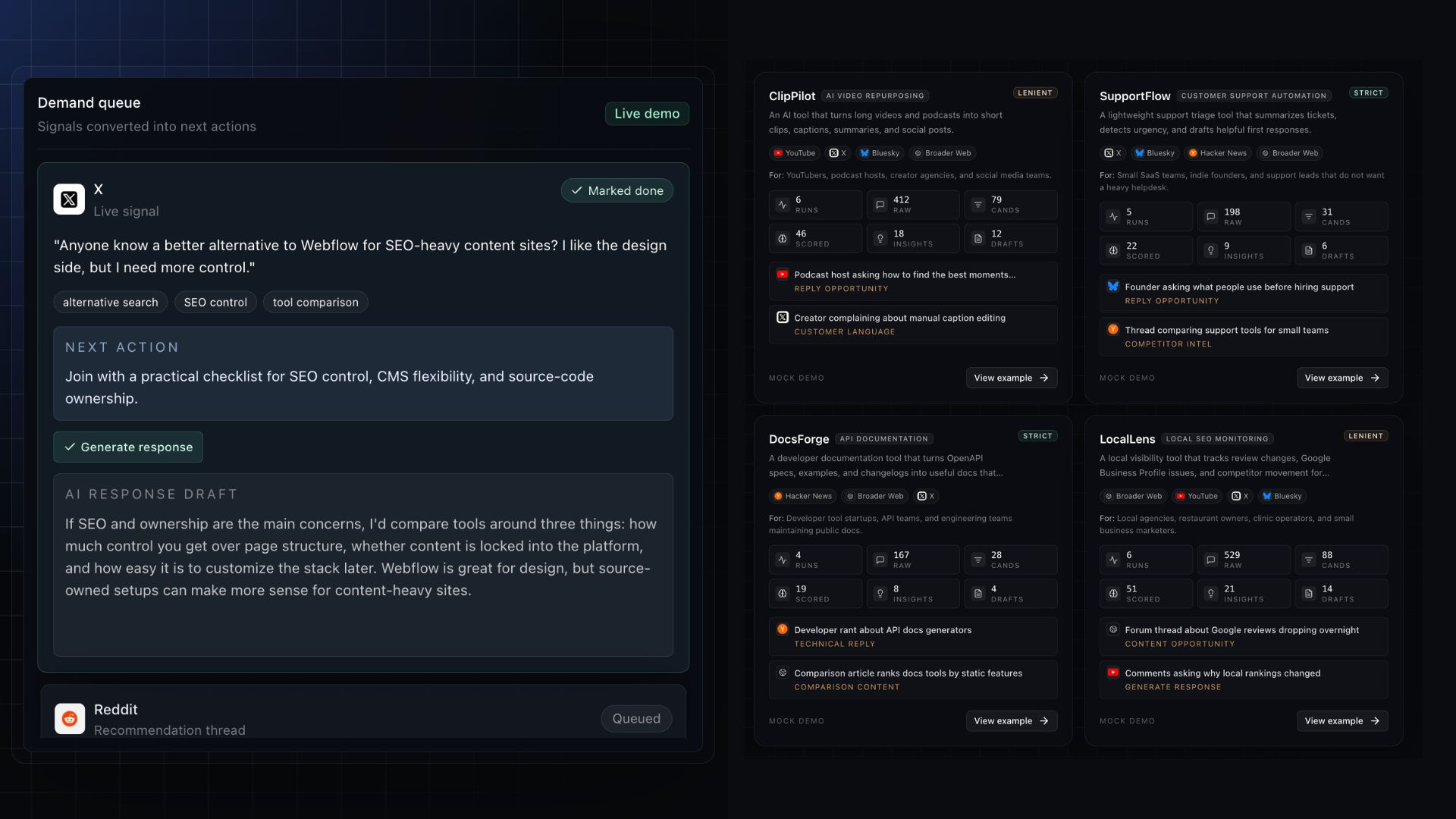
The Best AI Tool I Found to 10X Product Discovery
DemandHunt helps founders find public conversations where people are already asking for tools, comparing alternatives, or complaining about competitors.
As a developer who has been building software products for the past five years, getting online visibility is just as challenging as building the product itself.
When promoting my apps online, I basically have two options:
One is paid promotions. You can run ads, sponsor newsletters, pay writers, or buy placements. This can work, but it gets expensive fast, especially when you are still figuring things out, like your messaging and your target audience.
The other option is to promote your app manually. If you are like me and do not have a big budget for paid promotion, organic promotion on X, Reddit, YouTube, LinkedIn, and niche communities is usually the way to go.
As a solopreneur, it’s always option #2. I don’t know if you’d believe me, but I haven’t spent a dime on paid ads in years.
The only problem with this strategy is that doing this manually takes a lot of time. You need to spend hours posting about your app, searching for forums, articles, and social media conversations to find leads.
Well, the thing is, I recently found an AI tool that helps with this.
The tool is called DemandHunt.
It helps founders find public conversations where people are already asking for tools, comparing alternatives, complaining about competitors, or revealing content gaps. Instead of guessing where to promote your app, DemandHunt helps you find where demand already exists.
In this post, let’s discuss what product discovery is, why it’s important, and how you can leverage AI to automate this process.
Let’s get started.
Problems with Product Discovery
Product discovery sounds easy when people explain it online.
Talk to users. Validate the idea. Find a pain point. Build something people want.
Sounds simple, but it is not always easy to apply. Most founders and solo developers like me do not have a ready list of users they can interview. Many are building from scratch. Some are building during nights and weekends. Some are trying to validate an idea while also building the product, writing content, fixing bugs, and figuring out distribution.
This is where the process gets messy.
A lot of founders build from personal frustration. I think that is a good starting point. If you have experienced the problem yourself, you probably understand it better than someone who is only chasing a trend.
But personal frustration is not enough. You still need to know if other people have the same problem. You need to know how they describe it, where they talk about it, what tools they already use, and what made them unhappy with those tools.
This is where public conversations become useful.
People are already asking for tool recommendations on X. They are already complaining about competitors on Reddit. They are already asking questions in YouTube comments. They are already comparing products inside niche communities.
To give you an example, whenever I want to organically promote my product, Flux Labs AI, which supports Flux image models to generate AI images, I would often go to X and look for posts like this:
Then I would casually post a reply like this:
“I use Flux Labs AI because they offer the cheapest image generation on the market right now. Link: fluxlabs.ai”
See? These conversations are not clean research reports, but they are often more useful because people talk naturally. They do not use your marketing language. They use their own words. That is where you find the real pain.
This is the strategy I’ve been doing with my products since 2024, and it works. Check out the example GSC stats for one of my apps.
You can spend hours and hours finding one useful Reddit thread, then one X post, then a YouTube comment, then a random forum discussion. It can be tiring sometimes. So, you either stop doing it or only do it when you have extra time.
Solving Product Discovery with AI
DemandHunt looks for public conversations with stronger intent. These can be posts where people are asking for tools, comparing alternatives, complaining about competitors, or talking about problems your product can solve.
That kind of filtering is important because not every mention deserves your attention.
A vague post about “marketing being hard” is not the same as someone asking, “How do I find people on Reddit who are already looking for a product like mine?” The latter is more useful because the person is describing a specific problem.
The same thing applies to competitor research. A random mention of a competitor is not always useful. But a post saying the tool is too expensive, too complicated, or missing an important feature can tell you something about the market.
This is exactly the reason why AI can help founders move faster. It can find patterns across conversations that would take hours to collect manually. It can help you see what people complain about, what they ask for, and what words they use when describing the problem.
You can use those insights in different ways.
You can reply to relevant threads.
You can write content around questions people already ask.
You can improve your landing page copy.
You can study competitor complaints.
You can also use the data to decide which features are actually requested by the market.
These are the things that make DemandHunt super useful. It is a smart tool that searches for better signals before deciding what to build, write, or promote.
In the next section, I’ll get into the details of how you can use the app.
How to use DemandHunt AI
To get started, head over to DemandHunt, create an account, and read the details on the landing page. Most of the information you need is already described on the home page. If you want to learn more about how it works, I recommend checking the examples section or the help section.
Once you understand how the tool works, go to your dashboard page and create a new project. Non-paying users can use the tool for testing one project and validating the workflow. Here are the free perks you get.
1 project
3 discovery runs per month
5 insights per run
10 reply drafts per month
In the project creation screen, follow the on-screen instructions. The only three things that are required to be filled out manually are the app name, the app URL, and the app description.
These are very important because they will serve as a reference for the next sections if ever you decide to let the AI fill out the forms for you.
Here’s the context of the app in my example:
Project name: BloggFast
Website: https://www.blogg.fast/
What are you building?: Build your AI-driven blog site faster. Premium Next.js boilerplate for production-ready blog and news platforms.In the next sections, you need to fill out questionnaires that would help the AI narrow down the search query and find better results.
Audience and positioning: Who is this for, and what do you want to be known for?
Competitors and pain points: Two of the strongest demand signals are explicit competitor mentions and explicit complaints.
What’s great with DemandHunt is that it has a built-in “Generate with AI” button that automatically looks for the most appropriate answer to each field. I find this incredibly helpful in making the whole process faster.
Next, you need to set your preferred filtering level. This will determine how aggressively DemandHunt filters raw conversations before AI scoring. Here are the three filter levels:
Lenient: More results, more noise. Good while exploring a new market.
Normal: Balanced filtering. Recommended for most projects.
Strict: Fewer results, stronger signals. Good when you only want high-confidence opportunities.
For the source monitor. Check all the sources that you want the AI agent to search. Personally, I prefer looking for posts and conversations on X, Reddit, YouTube, and Broader web.
If your product is targeted towards hardcore programmers or low-level engineers, then it makes sense to choose Dev.to or HackerNews.
The last form you need to fill out is the Initial Tracking Keywords. These are optional seeds for the AI search-strategy step in the next stage. These are comma-separated values that you can type manually or let the AI generate for you.
Alright, once the project is successfully created, open it and scroll down to the Sources and tracking inputs section. These are the list of keywords and phrases that will be used by the AI agent to look for posts and conversations in the selected source platforms.
In the next step, run the Search strategy and wait for the list of search queries for each platform. You also get a list of Negative keywords, Competitor phrases, and Pain point phrases.
If there are items that you want to be removed from the list, you can manually edit them or click on the regenerate button to redo everything.
The next step is to execute the Discovery workflow. This is the most lengthy process that could take a couple of minutes to complete, since it collects and performs AI scoring for each raw mention across your enabled sources.
In the example above, I enabled three sources in Normal filter mode, and the Discovery workflow took around 5 minutes to complete.
I didn’t mind the wait, though, because the AI was able to retrieve 63 raw mentions, 12 AI-scored and accepted, and 5 high-quality insights.
From here, you can already go through the list and read the AI’s analysis report and suggestions for next steps.
In the example above, there is a suggestion to “Develop a content piece (blog post/tutorial) on ‘How to build valuable AI-powered comparison content with Next.js and BloggFast, avoiding SEO spam.’” This is a great way to validate a content idea because you are now sure that there is someone out there who’s looking or doing something similar.
But the real moat of this product is the Insights section. These are the highest quality posts or conversations that the AI found online that are worth acting on. It explains why the post it found matters and what kind of action you should take.
What’s even cooler is that you can let the AI draft a response for you!
In the example above, there is a link to the HackerNews thread that I could post and mention my product. In this case, instead of me reading the thread and drafting a response in my mind, I can just click on the “Generate reply” button, and the AI will write it for me.
What’s even cooler about this platform is that it has a feedback system that continuosly improve the system’s analysis and report creation over time.
Feedback helps DemandHunt understand what a useful signal looks like for your specific product. When you mark an insight as useful, good lead, good content idea, too broad, wrong audience, or not useful, the system learns your preference around intent, audience fit, topic relevance, and actionability.
Over time, this makes future runs sharper. DemandHunt can filter out weaker mentions, prioritize the kinds of conversations you actually care about, and generate better actions, such as stronger reply drafts, better article ideas, sharper comparison angles, and more relevant competitor insights.
Competitor Analysis Tool
I want to talk about this feature separately because its purpose is a bit different from the main product discovery workflow.
Product discovery is about finding live conversations where people are asking for tools, comparing options, or complaining about problems your product can solve.
Competitor Analysis is more strategic. It looks at the market around your product and helps you understand what other products are doing. Here’s a sample result after running the competitor analysis from my BloggFast product.
DemandHunt uses ProductHunt as the main source for this feature. It looks at launches, product pages, maker positioning, comments, categories, and related products. Then it turns that information into a short analysis report instead of just giving you a raw list of links.
In the example above, it did not just give me a list of similar products. It found related launches, positioning angles, comparison opportunities, and even suggested places where I could look for more insights from creators, founders, and developer communities.
This is a separate pipeline from normal discovery. It does not power the live mentions feed. It is built for comparison content, positioning research, competitor tracking, and alternative-product ideas.
I can’t stress it enough, but this is massively useful when you want to quickly get a hunch of the current demand and understand the market.
Why Should You Care?
Most early marketing is either guessing or doing a ton of manual research.
Founders guess what content to write. They guess which pain point to hit. They guess which competitor to compare against. They guess which community to post in. Sometimes it works, but in most cases, it’s a waste of time.
Trust me, I’ve done it plenty of times.
When you’re building a product, guessing gets expensive even if you’re not spending money. Writing the wrong content costs time. Promoting in the wrong places costs time. Building the wrong feature costs time.
DemandHunt cuts down on that guessing by showing you what people are already saying in public.
If a bunch of people keep asking for a cheaper alternative to a tool, that helps your positioning. If they keep complaining that a product is too hard to use, that helps your messaging. If they keep asking the same question, that’s an article, a landing page section, or a feature idea waiting to happen.
This is so important in terms of organic growth.
Good organic growth starts with knowing where demand already exists. Not just spamming social media or blog platforms with AI slop.
That’s why public conversations are useful. They show you what people are actually thinking about. What tools do they compare? What they hate about existing products. The exact words they use when they describe a problem.
You can’t get that from a blank content calendar.
This platform gives founders a cleaner way to pull those signals in. You’re not stuck with your own assumptions. You’re looking at real conversations and using them to figure out your next move.
Final thoughts
Alright, I hope you find this detailed review of DemandHunt useful. As I said, I’ve been building software products for years, and figuring out where to organically promote them is honestly just as hard as building them in the first place. Most days, I’d rather write code than scroll through Reddit looking for someone who might care about what I made.
Thankfully, AI-powered tools like this exist now. I’ve been using DemandHunt for a few weeks, and it actually works. Being able to hand off something this time-consuming to an AI agent and focus on more important stuff, like shipping features or writing the next article, feels like a real win.
That’s also why product discovery isn’t just surveys, interviews, or brainstorming new product ideas anymore. So much useful demand is already sitting out there in public. People are asking for tools, comparing alternatives, complaining about competitors, and describing their problems every day. The hard part is finding those conversations and turning them into something you can actually use for your product, marketing, and content.
For someone like me who doesn’t have a big budget for paid promotion, DemandHunt is a lifesaver.
Of course, there are now plenty of other ways founders can use AI for marketing and product discovery. DemandHunt is just one example.
What other ways do you think people can leverage AI for this? Let me know in the comments.


